How to make a song louder in mastering

Filed in Mastering | Techniques Leave a comment

Here is an excellent video on matching loudness when mastering from UK Mastering Engineer Ian Shepherd. Read the accompanying blogpost here: How to master a song loud – and the price you pay.

I found it really interesting, Ian often approaches things differently than I would, which leads me to new techniques. From this video in particular, I noticed he adds gain at the start of the fx-chain, and I would normally last. I asked him about it on Twitter.

ianshepherd: To avoid any confusion, the “How to make a song loud post” is new – and includes a video… http://t.co/288kGbqP
theaudiogeek: great video. Do you normally keep the limiter threshold at 0?
ianshepherd: Actually it’s usually at -0.3dB, but I sometimes reduce it to -1 if I’m pushing things really hard
ianshepherd: It works both ways – I just prefer to push the level into the multiband – it means I rarely need to tweak the threshold
theaudiogeek: interesting. I usually start at -6 for threshold. I do the loudening very last in the chain, and you use the gain plug first.
ianshepherd: And, reduces level-changes when I bypass. More info: http://t.co/V6EbhlPn and http://t.co/90FskFkS
ianshepherd: If you exceed -6 dB input with a threshold of -6, is it still clean ? Or does it clip ? Or does it depend on the DAW’s float?
theaudiogeek: here’s my general strategy for using Ozone 4. http://t.co/nqNwoFUX Lots of different ways to kill dynamics.
ianshepherd: Ah, OK. So setting Ozone’s threshold to -6 dB effectively boosts the gain, so the audible effect will be similar.

We both have our reasons, neither is wrong. I get better at mastering every time I talk to Ian.

If you liked this, you’ll probably get a lot of use from Ian’s eBook “Mastering with Multiband Compression“.

You may also like this episode of The Home Recording Show where we discussed Dynamic Range Day, mastering, etc HRS # 111 with Ian Shepherd and Allen Wagner

Time Adjusting a Multi-mic Performance

Filed in Audio Editing | Mixing | Tutorial 3 Comments

Several times in the past few years of doing the Home Recording Show podcast, we’ve had listeners write in asking about phase and often wondering why we can’t just move the tracks around after recording. Usually we answer saying that it can be done for guitars and a few other sources but never on drums and its not the same as actually moving the mic.

In the past month I’ve actually done this technique a few times on some tracks that were a little carelessly recorded and some others that just needed a little help. In all cases it has helped. Even if you’re super careful about mic positioning, this can be a very useful technique to know.

Click to view

Before I get into techniques and examples, I’ll give you the best reason I can think of for why shifting a recorded track is not the same as moving a mic.
Its not the same in any case where there is bleed or off axis sound. If you move the mic, you’re changing the off axis sound as well as the direct sound. If you time adjust, you’re just changing the relationship of that sound to another, the direct sound and bleed move together. If you time adjust by any large amount you could end up causing more problems because while the direct sound sources are in phase, the off axis sounds are not. You may also run into a situation where that causes an echoing effect when combined with other mics.
With that said, if there is already a problem with the tracks, its worth a try.

If you’re confused about what this is all about, let me play some examples.

Guitar Example

I was given some guitar tracks as part of a mix. There is an SM57 and an AT4033 on the amp. I don’t know the exact positions other than that the 4033 was a little further away. The mics sound ok on their own but are completely useless when combined.

Shure SM57

Audio clip: Adobe Flash Player (version 9 or above) is required to play this audio clip. Download the latest version here. You also need to have JavaScript enabled in your browser.

Audio-Technica 4033

Audio clip: Adobe Flash Player (version 9 or above) is required to play this audio clip. Download the latest version here. You also need to have JavaScript enabled in your browser.

Both mics combined.

Audio clip: Adobe Flash Player (version 9 or above) is required to play this audio clip. Download the latest version here. You also need to have JavaScript enabled in your browser.

Inverting polarity on one mic.

Audio clip: Adobe Flash Player (version 9 or above) is required to play this audio clip. Download the latest version here. You also need to have JavaScript enabled in your browser.

Techniques

As you can hear, there’s an obvious comb filtering issue and it doesn’t go away with the polarity switch alone.
At this point we have a few options

  1. get rid of one of the mics. The downside being that either mics is kinda boring
  2. time adjust by nudging the second file earlier
  3. time adjust by delaying the first track

Options 2 or 3 will have the same result. One method is not really better or worse.

I don’t like option 1. It makes me feel lazy.

With either option 2 or 3 I need to get a rough estimate of how much offset there is. This means finding a transient and zooming in close.
When it’s the same source with two mics the waveforms should be fairly similar. Find a transient on the first track and drag a selection to that peak on the second track.
Set your timebase in the DAW to samples and you should see how much of a delay you need to compensate for.

You can use either method to time adjust.
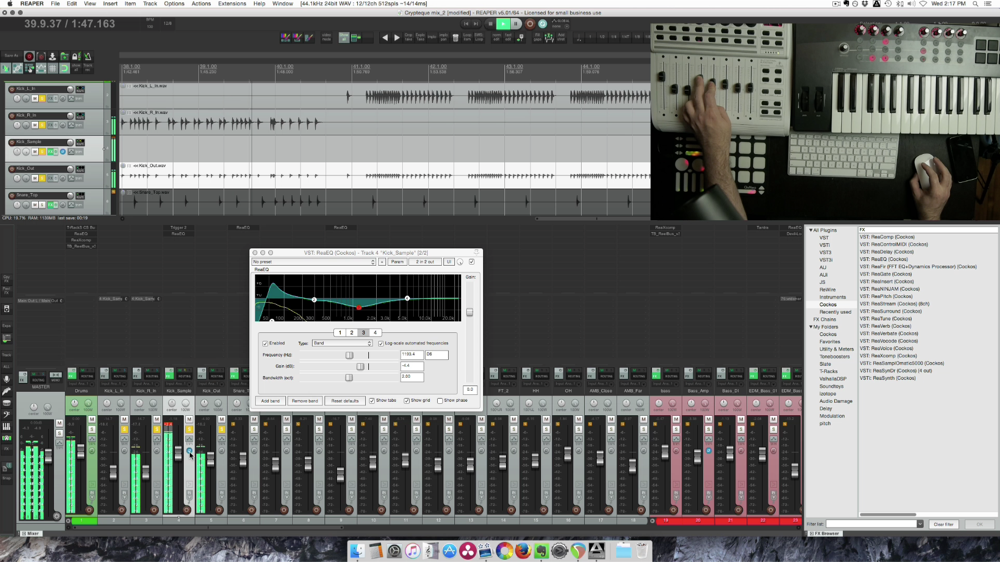
In Reaper there is brilliant feature that makes nudging the audio in this type of situation very easy. Reaper has an option to show a mono waveform of the combined active tracks within a folder. You can actually see the two waveforms stacked. Simply drag one of the tracks and line up the waveforms. As far as I know this only works in Reaper. [see image up at the top]
In Pro Tools you would set your nudge value to be the same number of samples we calculated earlier. Nudge either the close mic later, or far mic earlier.

If the mics were fairly close together it should be under 300 samples. In this case it was just 56 samples.

If you want to use a plugin for this, find one that works in samples and enter the value.

Let’s here how these mics combine after adjustment.

Time adjusted combined mics

Audio clip: Adobe Flash Player (version 9 or above) is required to play this audio clip. Download the latest version here. You also need to have JavaScript enabled in your browser.

SO much better, and we have a sound that is more tonally interesting than either mic alone.

Ensemble example

Here is another situation. This is a 3 track live recording in Cuba I was given to mix and master. There are two Neumann M150s omni tube condensers in front of the musicians and a cardioid mic within the group to pick up vocals and percussion.

Original mix

Audio clip: Adobe Flash Player (version 9 or above) is required to play this audio clip. Download the latest version here. You also need to have JavaScript enabled in your browser.

I found that shifting the tracks slightly improved the center image and made the recording sound a little more focused, it is a fairly subtle change. In this case I used the left side mic as the target, as it was latest and adjusted the right side by 194 samples and center mic by 513.

Time adjusted

Audio clip: Adobe Flash Player (version 9 or above) is required to play this audio clip. Download the latest version here. You also need to have JavaScript enabled in your browser.

Drum kit example

If you’re still interested in this at all, you probably want to know how it works on a drum kit. Until today I haven’t tried.

I have a drum kit with 2 overheads, kick, snare and 3 tom mics. I’m going to use the snare as the standard and move the other tracks around to match.

Here are the drums with just levels, panning and polarity. No EQ or any other processing .

Audio clip: Adobe Flash Player (version 9 or above) is required to play this audio clip. Download the latest version here. You also need to have JavaScript enabled in your browser.

On the drums, at least on this recording, the change was very subtle. The longest delay was 190 samples between the snare and overheads. Only 4ms. That’s a tiny amount. The result is a little less wide having removed the distance from the overheads to the snare.

After timing adjustment

Audio clip: Adobe Flash Player (version 9 or above) is required to play this audio clip. Download the latest version here. You also need to have JavaScript enabled in your browser.

Sometimes it makes a huge difference, sometimes its subtle. I think its worth a few minutes of experimenting even when you are very careful about your mic placement.

This content was originally written for The Home Recording Show episode #141. Click here to listen and hear the discussion.

Guest Post: Analog Warmth

Filed in Mastering | Mixing | Tutorial Leave a comment

This guest post comes from Barry Gardner, mastering engineer at Safe And Sound online mastering.
You may also like his previous contribution to AGZ, The 24 Bit Advantage.

Analogue warmth, what it is, and how to inject it into your recordings and mixes.

Warmth in the context of audio production, is a hot topic. With the popularity of almost all digital signal paths, it has become much cheaper to record, mix and master your music. However many musicians, producers and engineers feel that there is sometimes an elusive sound quality missing from modern digital production methods. In modern times, three common techniques in music recording and production have changed since domestic and DIY audio production has proliferated. These are namely, the use of multi-track tape machines, large format analogue consoles and large recording studio spaces. These changes are the more obvious ones and have definitely changed the quality of audio.

Defining warmth in recordings and mixes.

Analogue warmth is subjective and difficult to describe in words and everyone’s interpretation is slightly different. However there are a few statements which appear to be commonly accepted as characterizing warmth within a mix or recording.

  • A gelling of instruments, yet without compromising their own defined space in both tone and stereo image.
  • A lack of harshness and rounded quality.
  • A punchy and smooth sounding lower mid range.
  • Not excessively bright and the brightness that is present is smooth.
  • A punchy low frequency range.

To me personally, warmth can be a number of things. I can recall analogue tape recordings from the 1970′s which I would define as being warm. I can also produce something I define as warm with simple attenuation of high frequencies. In some instances a very rounded sound with a strong lower mid presence can sound warm to the ear. With this in mind I would like to suggest some pointers on how to create warmer sounding mixes and recordings.

What equipment and techniques can we use to enhance warmth?

All music recording starts with setting up microphones, experiment with different mic positioning or mic choices in order to get less bright recordings, although take care not to box yourself into a corner,  double mic instruments with secondary ribbon or dynamic mics in addition to your usual choices.

A common source of warmth can be certain audio transformers which can reduce harshness in the upper registers and provide additional body in the lower mid range. There is a wide selection of vintage and retro styled mic preamps that utilize audio transformers at the input stage. Audio transformers are usually used at the inputs and outputs of equipment and can be found in many outboard equipment types such as equalizers and compressors as well as microphones. They are often overlooked in the quest for warmth.

One of the most powerful tools which is overlooked for generation of warmth is equalization, you have the power to sculpt and adjust sounds as is required. Do not be afraid to experiment with rolling off high frequencies to reduce harshness, presence and brittleness in a mix. You can also employ EQ on effects returns to soften them and make them gel better with the source.

Compression has the ability to smooth transients in recordings and fast attack times with 1dB or so of gain reduction can work wonders in smoothing out abrasive, harsh and aggressive transients in a mix. Analogue tape applied a natural form of compression when overloaded gently. It is a technique that can be used to good effect. Very gentle group or master bus compression can also provide a sense of “wholeness”.

In addition to these essential tools, in software form there is an emulation of virtually  every piece of classic analogue studio equipment ever built. Often these software emulations rely on some kind of valve/tube saturation. In my experience valves do not add warmth as such but they can give a perception of thickening a sound as harmonics are added. Some emulations are better than others and I suggest keeping an open mind and downloading some demo’s and spending some quality listening time with them. Try and discern which ones seem to add that special something in terms of tone.

By experimenting with these techniques and equipment choices you should be able to start adding some warmth to your mixes. As always when experimenting in audio production take some time to rest your ears over night and double check that you have not laid the processing on too thick.

This guest post comes from Barry Gardner, mastering engineer at Safe And Sound online mastering.
You may also like his previous contribution to AGZ, The 24 Bit Advantage.

Review: TC Electronic Impact Twin

Filed in Audio Interface | Gear | Review 15 Comments

Overview
The TC Electronic Impact Twin is a mid-level firewire interface with 14 inputs and outputs. It has two preamps, onboard effects, S/PDIF, ADAT Lightpipe and MIDI I/O. It’s not as compact as some other interfaces but packs a ton of features and i/o yet still small enough to fit in a backpack.

The Impact Twin caught my eye in spring 2011. I was looking for a more compact replacement to my M-Audio Profire 2626 (see review here), or a way to expand the I/O of my system, or at least a portable option so I don’t have to tear apart my studio all the time I go out to record. I trust TC Electronic to make nice clean digital gear, for about $400 it had pretty much every feature and function I wanted. I ordered one through Revolution Audio (note: I work for this company and got dealer pricing) and when it arrived I started writing my review. I don’t really have a good excuse why it took nearly a year to write, other than that l got busy being awesome in other aspects. Jump down to the end if you’d like to see what I think of it after about 8 months of owning it.

Continue Reading

Quiztones frequency trainer for Mac now available

Filed in New Product Announcement 4 Comments

Quiztones is a frequency ear training app for amateur and professional audio engineers and musicians. Quiztones uses frequency-altered tones, noise and musical loops to train your ears and help develop more acute listening and frequency recognition skills. Previously I blogged about the Quiztones app for iPhones, Now it is available on your Mac through the App Store. For more info, visit Quiztones.net.

Quiztones will…

• Sharpen your ears & frequency recognition skills
• Improve your mixing and EQ chops
• Prevent noise and frequency buildup in your mixes & recordings
• Eliminate the need to sweep for frequencies

Quiztones cleverly uses quizzes to engage users in training exercises. Track your progress with the built-in score log.

Each EQ Quiz includes four trainers:

• Easy frequency boost
• Hard frequency boost
• Hard frequency cut
• Expert frequency boost (1/3 octave)

Quizzes included in version 1.0:

• iTunes/Music Library
• Tones
• Pink Noise
• Piano
• Bass
• Drums
• Strings
• Strings 2
• Orchestra
• Upright Bass
• Female Vocals
• Electric Guitar
• Acoustic Guitar

Get Quiztones for Mac in the App Store

Get 25GB of offsite backup FREE from Gobbler (limited time offer)

Filed in Software Leave a comment

Gobbler is a backup application designed for studios. I’ve been using it for several months to backup my studio projects and love it. The Gobbler app automatically finds my project files and all related assets and uploads them to the cloud. (it uploads the projects I tell it to, not everything automatically) It runs in the background so it doesn’t interfere with working in my DAW.
It takes minimal effort from me which is exactly what I want from a backup program.

Sign up by December 7th and get 25GB FREE for a Year!
http://www.gobbler.com/i/YggCH2

Note-Gobbler is Mac only right now, sign up and you can use your extra storage when the Windows version comes out.

TOP